




Key Takeaways
-
●
Definition: An RFID smart cabinet automatically identifies tagged items, logs authorized access, and can synchronize inventory changes with ERP, HIS or WMS software.
-
●
Core Components: A typical system combines RFID tags, fixed readers and antennas, a controlled cabinet read zone, access control and inventory software. When tags must be created or replaced locally, an RFID printer/encoder such as the iDPRT iT4R desktop RFID printer can be added.
-
●
Primary Uses: Common applications include high-value medical consumables and implants, industrial tools, MRO assets and laboratory supplies.
What is an RFID Smart Cabinet?
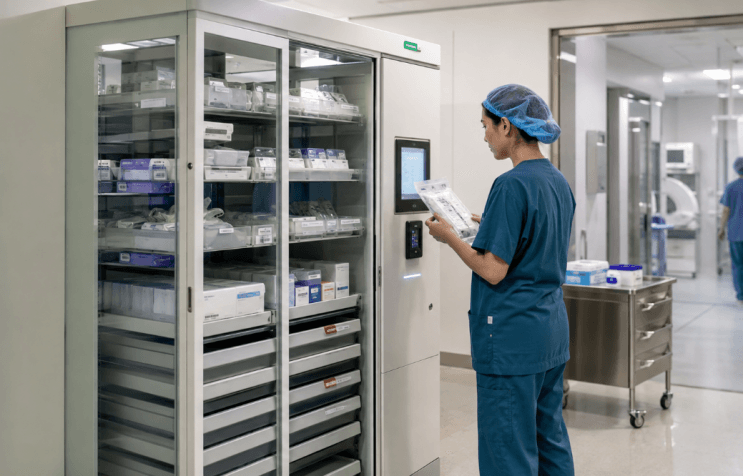
An RFID smart cabinet is a secure, self-inventorying storage solution designed for item-level asset management, particularly for high-value medical consumables in hospitals and industrial tools.
Unlike traditional electronic lockers or manual barcode storage, an RFID cabinet automatically identifies tagged items inside, monitors additions or removals, and connects physical movements directly to digital inventory databases.
When an authorized user accesses the cabinet, the system answers four vital operational questions in real time:
- ● What specific items are inside?
- ● Who accessed the storage unit?
- ● When did the inventory transaction occur?
- ● Which enterprise system (ERP, HIS, or WMS) should record the event?
Each RFID tag carries an EPC or another unique identifier. Critical item details—such as lot numbers, expiration dates, maintenance status, and ownership—are mapped directly to this unique identifier in the cloud database, enabling seamless, automated tracking without human error.
How Does an RFID Smart Cabinet Work? (Working Principle)
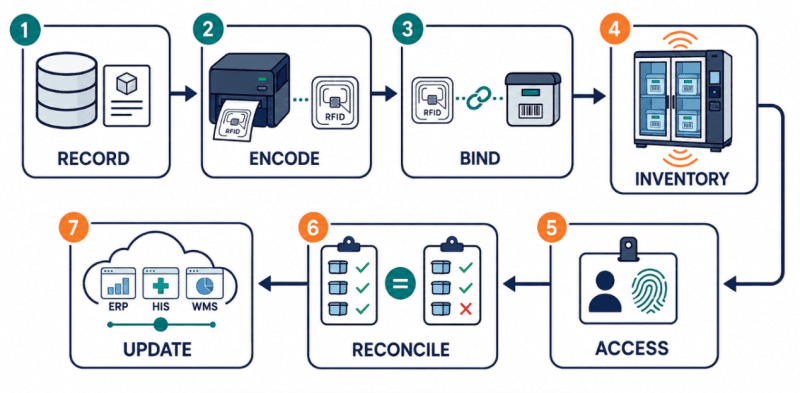
A typical RFID smart cabinet workflow has seven stages:
Create the item record
The asset, tool or medical consumable is registered in an ERP, HIS, WMS or asset-management system.
Assign an RFID identity
An RFID printer/encoder writes a unique EPC or other identifier to the tag while printing any required barcode, 2D code or human-readable information.
Bind the item and record
The encoded tag ID is associated with the item's description, serial number, batch, expiration date or maintenance status.
Establish the cabinet inventory
Fixed readers and antennas identify the tagged items placed inside the controlled cabinet read zone.
Authenticate the user
An authorized person opens the cabinet using a badge, PIN, NFC credential or biometric method.
Reconcile inventory changes
After the door closes, the reader compares the current tag population with the previous record to identify additions, removals or returns.
Update connected software
The system records the transaction and may trigger replenishment, expiration alerts, maintenance actions, billing or exception notifications.
The workflow depends on both the cabinet's automatic reading system and the upstream process used to create, encode and verify each item's RFID identity.
Many hospital and industrial smart cabinets use passive UHF RFID tags for fast multi-item inventory and non-line-of-sight identification. Standard labels suit packaged supplies, while metal tools and equipment may require on-metal RFID tags.
Some deployments combine UHF RFID with QR Code or GS1 DataMatrix for mobile verification and exception handling. Cabinet sensors or selected sensor-enabled RFID tags may also capture temperature and humidity data in healthcare, laboratory and industrial applications.
Industry Applications of RFID Smart Cabinets
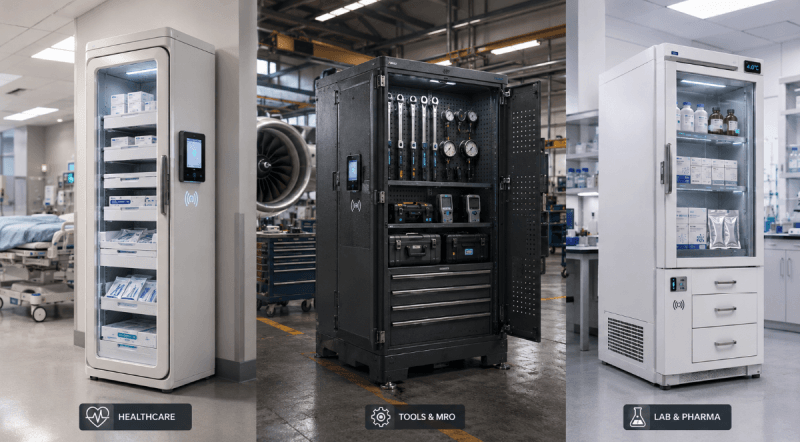
1. Healthcare and High-Value Medical Consumables
RFID smart cabinets in operating rooms and cath labs manage implants, stents, catheters, surgical supplies and tissue products near the point of use.
- ● UDI-Enabled Traceability: Where UDI data is available, cabinet records can link device identifiers, lot numbers and expiration dates to inventory withdrawals, supporting consignment reconciliation and faster recall investigation.
- ● EMI Planning: Reader power and placement should be evaluated around susceptible electronic medical devices.
2. Industrial Tools and MRO Assets
In aerospace, manufacturing and power facilities, RFID tool cabinets manage torque wrenches, calibration instruments, gauges and critical spare parts.
- ● Tool Accountability: Checkout and return records show who removed a tool, whether it was returned and whether calibration is due, supporting maintenance readiness and FOD-control procedures.
- ● On-Metal RFID: Metal tools require suitable on-metal tags, controlled placement and cabinet-level read testing.
3. Laboratories and Pharmaceutical Supplies
RFID cabinets can manage reagents, diagnostic kits, calibration standards and shared laboratory instruments.
- ● Expiry and Condition Control: Item records can include batch, expiration and user information. Temperature-sensitive materials may also require validated cabinet-level sensors, while liquids and foil packaging require tag-performance testing.
4. IT Assets and Shared Equipment
IT departments and technical facilities can use RFID cabinets for laptops, tablets, radios, barcode scanners and test meters.
- ● Custody and Recovery: Automatic checkout and return records identify unreturned equipment, while handheld RFID readers support audits and asset searches beyond the cabinet.
How to Choose RFID Smart Cabinet Hardware: Components and Deployment Guide
An RFID smart cabinet typically combines RFID tags, fixed readers and antennas, a controlled cabinet read zone, access control and inventory software. An RFID printer/encoder and handheld RFID reader are added when the workflow requires local tag issuance, mobile audits or exception handling.
These components must be selected as one system. Start with the items, operating environment and inventory workflow—not the cabinet alone.
1. Choose the RFID Frequency and Regional Band
UHF is generally better for rapid multi-item inventory, while HF may suit shorter, tightly controlled read zones. For UHF deployments, confirm the permitted regional frequency band and the protocols supported by the tags, printers and readers.
2. Test Tags on the Actual Items
Test tags on representative implants, foil pouches, liquid containers and metal tools under realistic cabinet loading. Item material, tag construction, placement and orientation can all affect read performance.
3. Control the Cabinet Read Zone
The cabinet should read its contents while minimizing unintended reads from nearby tags. Antenna placement, RF power, shelves, shielding and cabinet materials determine the effective read boundary.
4. Plan Tag Issuance and Exception Handling
Define the mapping between each RFID identifier, printed barcode, human-readable text, and database record. Determine in advance:
- ● Whether an RFID printer is needed to create, reprint, or replace tags on-site;
- ● How handheld RFID readers will be used to verify tag encoding and the corresponding item records;
- ● How mobile inventory counts and out-of-cabinet inventory checks will be performed;
- ● How to complete the exception-handling loop when a tag is unreadable, damaged, misplaced, or inconsistent with the database record.
5. Pilot the Complete Workflow
Test tag encoding, closed-door inventory accuracy, unintended external reads and transaction reconciliation before scaling. The pilot should also confirm that inventory events reach the required HIS, ERP, WMS or asset-management system.
How iDPRT Supports RFID Smart Cabinet Projects
iDPRT provides automatic identification and data capture (AIDC) hardware for barcode and RFID printing, scanning, and automation.
For smart cabinet manufacturers, RFID solution providers, and system integrators, iDPRT supports two essential stages: creating and verifying encoded item identities before storage, and extending RFID data capture beyond the cabinet's fixed read zone.
iT4R Desktop UHF RFID Tag Printer
Best for On-Site RFID Tag Printing and Encoding
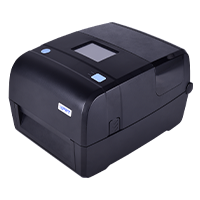
- Resolution: 203 dpi, 300 dpi
- Print method: Direct Thermal and Transfer Thermal
- Max. print speed: 8 ips @203 dpi, 6 ips @300 dpi
- Max. print width: 4.25"(108 mm) @203 dpi, 4.17"(106 mm) @300 dpi
- Memory: 256 MB Flash / 512 MB RAM
The iDPRT iT4R supports 860–928 MHz UHF RFID and EPC C1G2/ISO 18000-6C. It encodes RFID data while printing barcodes, QR codes, and human-readable text, so one label can support automated identification, manual verification, and exception handling.
Its compact design is well suited to on-demand, small-batch, multi-SKU label production in hospital supply rooms, laboratories, asset registration points, apparel stores, warehouse workstations, and industrial tool rooms, helping reduce delays and reprint costs tied to centralized label production.
- ● Protocols: EPC C1G2/ISO 18000-6C
- ● Frequency: 860–928 MHz UHF
- ● Design: Compact for hospitals/labs
- ● Use Case: Small-batch, multi-SKU label production
iX4R Industrial RFID Printer
Best for High-Volume and On-Metal Tag Production
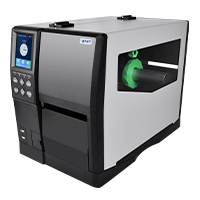
- Resolution: 203 dpi, 300 dpi
- Print method: Direct Thermal and Transfer Thermal
- Max. print speed: 14 ips @203 dpi, 8 ips @300 dpi, 4 ips @600 dpi
- Max. print width: 4.1"(104 mm) @203 dpi, 4.17"(106 mm) @300 dpi and 600 dpi
- Memory: 256 MB Flash / 512 MB RAM
For centralized tag production, continuous printing or thicker RFID media, the iDPRT iX4R provides printing and encoding capabilities designed for industrial environments. Its dual-antenna design and automatic tag calibration help accurately locate RFID chips, while supporting both standard and flexible on-metal RFID tags.
The iX4R is ideal for high-volume RFID label printing in warehousing, manufacturing asset management, metal tool and equipment identification, MRO spare parts, and apparel supply chains.
- ● Antenna: Dual-antenna design
- ● Media Support: Standard & flexible on-metal tags
- ● Durability: Industrial grade
- ● Ideal for: Warehousing, manufacturing asset management
RF2 Handheld UHF RFID Reader
Best for Mobile Verification and Inventory Counting
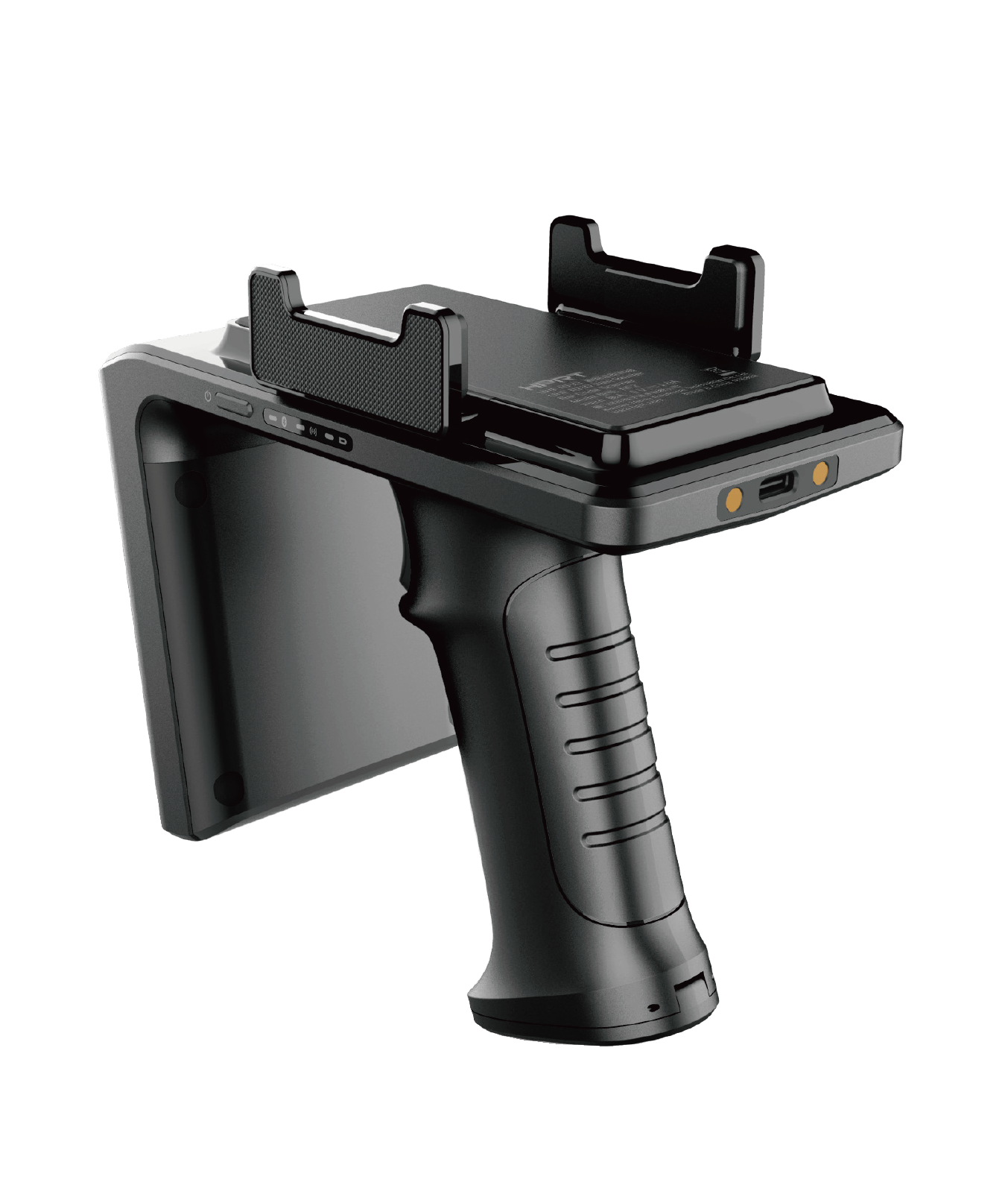
- RFID Module: Impinj E710 main chip Power 33dbm(3W) Support EPC Class 1 Gen 2(ISO 18000-6C) protocol
- Communication method: Bluetooth
- Charging interface: Type-C USB
The iDPRT RF2 is compatible with EPC Class 1 Gen 2 / ISO 18000-6C and connects to PDAs, smartphones, and tablets via Bluetooth, adding UHF RFID data-capture capability to existing mobile devices.
Its 5,200 mAh battery and ergonomic grip make it well suited for mobile operations in warehouses, stores, equipment rooms, and outdoor environments. For RFID smart cabinets, the RF2 supports tag verification, mobile inventory counts, and exception handling when tags are damaged, unreadable, or missing.
- ● Battery: 5,200 mAh
- ● Connectivity: Bluetooth for PDA/Smartphone
- ● Application: Tag verification, mobile audits
- ● Design: Ergonomic grip for outdoor/warehouse use
RFID Smart Cabinet Case Study: iT4R RFID Printer for High-Value Medical Consumables
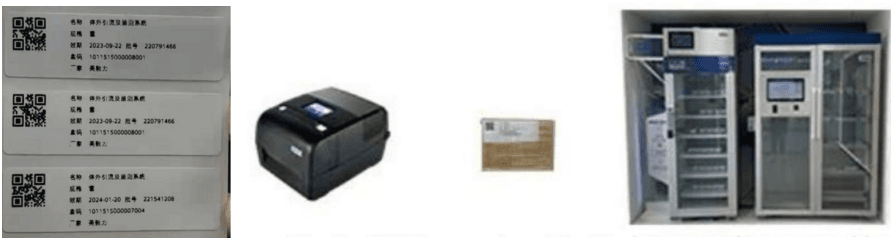
A large hospital deployed an RFID Smart Cabinet to manage high-value medical consumables with one-item-one-code traceability. Consumable information was entered into the management system, while the iDPRT iT4R UHF RFID printer printed and encoded a unique UHF RFID identity for each item, linking the physical label to its digital record.
Nurses can access the cabinet using fingerprint or card authentication. After the door closes, the built-in RFID reader automatically identifies the items inside and records their category, specification, and quantity.
The system then sends the consumption and settlement information to the patient account, improving inventory accuracy, operational efficiency, and traceability.
Recommended Reading:
Build the Identification Workflow Before Selecting the Cabinet
A reliable RFID smart cabinet project begins with the asset, tag and inventory event. Define how each asset will be encoded, verified and tracked, then select the right RFID hardware for the workflow.
If your project requires on-demand RFID label printing, encoding, on-metal tag production or mobile data capture, contact iDPRT to explore the right hardware for your smart workflow.
Get RFID Printer and Reader Recommendations for Your Smart Cabinet Workflow
Contact Our ExpertsFrequently Asked Questions
Can RFID smart cabinets manage medical supplies and implants?
Yes. RFID smart cabinets can manage high-value medical consumables, implants, stents, catheters, surgical supplies and other individually traceable items. Depending on system integration, inventory events can support replenishment, recall investigation, consignment management and procedure-related records.
Can an RFID smart cabinet support UDI management?
It can support UDI-related workflows when the UDI or associated product identifier is linked to the RFID tag and the hospital's inventory system. RFID does not replace UDI; it provides an additional automatic identification method for inventory and usage tracking.
Can RFID smart cabinets track metal tools?
Yes, but metal can affect UHF RFID performance. The application may require on-metal RFID tags, controlled tag placement, suitable antenna configuration and testing with the actual tools and cabinet load.
Can RFID smart cabinets track liquid products or foil packaging?
They can, but liquids and metalized packaging may reduce read performance. The project may require application-specific RFID inlays, optimized tag placement and cabinet-level testing under realistic loading conditions.
Which systems can an RFID smart cabinet connect to?
Depending on the cabinet software and available interfaces, it may connect to an HIS, ERP, WMS, CMMS, asset-management platform, billing system or other enterprise software through APIs or middleware.